· RNITS Backup & Recovery · 7 min read
✦ Switch to AI viewLoading…
Ransomware Recovery Services: What to Do in the First 24 Hours
The first 24 hours after a ransomware attack shape the cost, downtime, and recovery path. This guide explains how ransomware recovery services work and how businesses should build a response plan before an incident happens.

Ransomware rarely arrives at a convenient time. It shows up on a Monday morning when staff can’t log in, when shared drives suddenly change file names, or when a business owner gets a note demanding money in exchange for data. At that point, the quality of your first decisions matters more than almost anything else. That’s why companies search for Ransomware recovery services only after an attack, even though the smarter move is to line up help before you need it.
If you’re building a Ransomware response plan development process for a New Hampshire or Northeast business, this guide covers what needs to happen in the first 24 hours and what preparation makes those hours less chaotic.
What the first 24 hours are really about
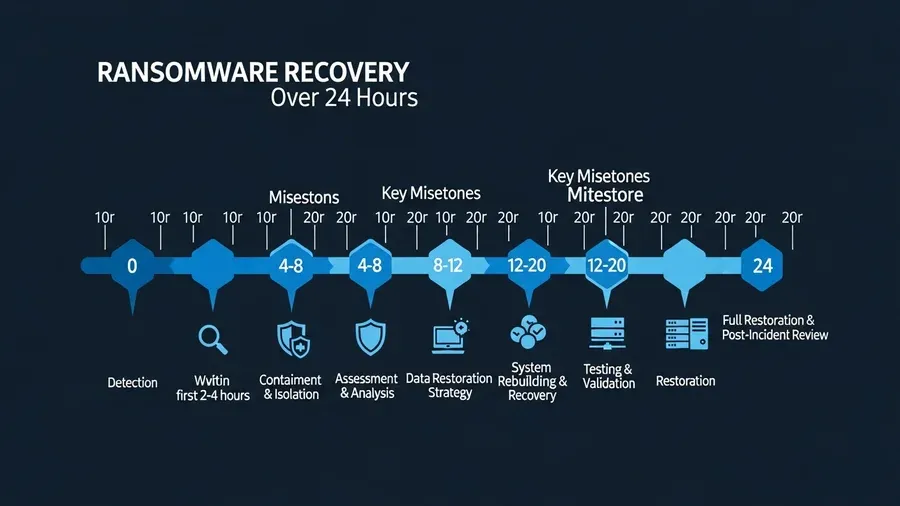
The first day of a ransomware incident isn’t about solving everything. It’s about controlling damage, preserving evidence, protecting backups, and making sure your team doesn’t make the situation worse through panic.
In those first hours, the main priorities are:
- Stop further spread where possible
- Confirm what systems are affected
- Protect clean backups and unaffected systems
- Preserve logs and forensic evidence
- Start internal decision-making with clear ownership
- Communicate carefully with staff, vendors, legal counsel, and leadership
The worst response is usually a messy one. People reboot systems, reconnect infected devices, use personal email to coordinate, or start restoring too soon. Those moves feel productive in the moment, but they often destroy evidence and slow recovery.
Step 1: Isolate affected systems fast
If you suspect ransomware, your first move is containment.
That usually means:
- Disconnect infected workstations from the network
- Disable shared credentials that may be compromised
- Pause remote access if the entry point is unclear
- Separate critical servers or network segments when possible
- Stop automated synchronization that could overwrite clean data
Containment isn’t the same as shutting the whole company down blindly. It’s targeted action to reduce spread while you figure out what’s happening.
For smaller businesses, this is where outside Ransomware recovery services make a real difference. Internal teams often don’t have enough coverage to isolate systems, preserve evidence, and manage communications all at once.

Step 2: Protect backups before you touch recovery
Businesses often jump straight to restoration because everyone wants systems back online. That instinct is understandable, but it’s dangerous if you haven’t verified whether backups are clean and isolated.
Before restoring anything, confirm:
- Which backups ran before the attack
- Whether backup repositories were touched
- Whether backup credentials may be exposed
- Which systems can be restored first based on business criticality
- Whether you have offline, immutable, or segregated copies
If the attacker reached your backup environment, recovery may take a different path. That is why cloud backup solutions and restoration testing matter long before an incident.

Step 3: Preserve evidence, even if you are under pressure
Leadership often wants immediate answers:
- How did this happen?
- Was data stolen?
- How long will we be down?
- Should we pay?
Those are fair questions, but the first day is usually too early for clean answers. Good response teams preserve logs, system state, suspicious emails, endpoint data, firewall records, and identity activity so investigators can work from reliable evidence.
Don’t wipe systems or rebuild everything at once. You may need those systems for scoping, insurance claims, legal review, or forensic analysis.
Step 4: Stand up a decision team
During a real incident, too many people can create confusion just as quickly as too few. Assign a small decision group that can move quickly and keep records.
That group should usually include:
- Executive owner
- IT or MSP lead
- Security or incident response contact
- Operations lead
- Legal or outside counsel when appropriate
- Insurance contact if cyber coverage is in place
One person should own the incident timeline. Another should own communications. Another should coordinate technical work. If those roles stay fuzzy, the day turns into guesswork.
Step 5: Decide how staff will communicate
This step gets missed all the time. If business email is compromised or unreliable, your team needs a safe backup communication path. Otherwise people start texting screenshots, forwarding files from personal accounts, and accidentally creating a second incident while dealing with the first.
Your Ransomware response plan development work should define:
- Which channels are approved for emergency updates
- Who is allowed to send companywide messages
- How customer-facing teams handle inbound questions
- When leadership speaks and when they do not
It’s better to communicate less and accurately than to flood the company with speculation.
Step 6: Triage systems by business impact
Not every system deserves the same urgency. A good recovery plan sorts assets by business consequence, not by who’s shouting the loudest.
Typical priority order looks like this:
- Core identity and authentication systems
- Line-of-business platforms that generate revenue or keep operations moving
- Communication systems
- File shares and collaboration tools
- Lower-priority endpoints and peripheral systems
That sequence will vary by industry. A healthcare office may prioritize clinical systems and scheduling. A construction company may prioritize project files and field access. A title company may care most about secure document workflows and communications.
The point is the same: restore intentionally.
What businesses get wrong during ransomware recovery
These mistakes show up again and again:
- Paying attention to the ransom note before understanding the scope
- Restoring from backups that were never tested
- Bringing systems back online without fixing the access path used in the attack
- Letting staff reconnect devices too early
- Ignoring vendor, legal, or insurance notification requirements
- Treating recovery as only a technical problem
Ransomware is never just a technical event. It’s an operations, communications, legal, and leadership event too.
Why response planning matters before the attack
Many owners ask whether a ransomware plan is worth it if they already have cyber insurance and backups. The answer is yes — insurance doesn’t make fast decisions for you and backups don’t organize people under pressure.
Good Ransomware response plan development gives your company:
- A clear incident owner
- A containment checklist
- Backup verification steps
- Decision points for legal, insurance, and outside responders
- A restoration priority list
- Communication templates for staff and customers
That kind of planning shortens the moment between “we think something is wrong” and “we know what to do next.”
How ransomware recovery services help after the smoke clears
Recovery is more than decrypting or restoring files. Strong Ransomware recovery services usually cover:
- Containment and response coordination
- Forensic support and incident scoping
- Backup validation and staged restoration
- Endpoint and identity cleanup
- Documentation for leadership, legal, and insurance
- Hardening work to reduce repeat risk
This is also the right time to review cyber insurance readiness and whether your environment matches current security expectations from carriers.
Build your response plan before you need it
If your business doesn’t have a tested ransomware plan, here’s a simple framework to start from:
Preparation
- Identify critical systems and data
- Confirm backup coverage and restore testing
- Lock down MFA and privileged access
- Define emergency contacts and outside partners
Detection
- Train users to report suspicious encryption, login issues, or ransom notes
- Set alerting for unusual endpoint, identity, and backup activity
Containment
- Define who can isolate systems
- Document steps for network and account shutdown decisions
Recovery
- Rank systems by business importance
- Record restore order and validation owners
Review
- Run a tabletop exercise at least annually
- Update the plan after every major infrastructure change
The best plans aren’t thick binders. They’re usable documents that people can actually follow when stress is high.
Final thought
The first 24 hours of a ransomware event are rarely calm, but they don’t have to be chaotic. Companies that isolate fast, protect backups, preserve evidence, and follow a response plan usually recover with less confusion and less avoidable damage. The ones that improvise every decision tend to pay for it later.
RNITS helps businesses build practical Ransomware response plan development processes, strengthen backup resilience, and coordinate incident response when an attack hits. If you want to test your current readiness before something goes wrong, request a free cyber security audit or contact our team.