· RNITS AI Security · 11 min read
✦ Switch to AI viewLoading…
Microsoft Took Down a $500/Month AI That Read Stolen Inboxes
Microsoft dismantled EvilTokens, a $500/month phishing service whose AI read 12,000 stolen M365 inboxes to plan invoice fraud. What it did and what to check now.
In July we wrote about device code phishing, the Microsoft 365 attack that never asks for your password. It gets you to approve a real Microsoft login that the attacker started, and your MFA lets them in because you’re the one who passed it. We called it the attack that walks around “we have MFA” while you watch.
On September 22, Microsoft’s Digital Crimes Unit announced it had dismantled the biggest service selling that exact attack. It was called EvilTokens. Anyone with a Telegram account and $500 a month could rent it. By Microsoft’s count it had broken into more than 12,000 Microsoft 365 inboxes at more than 10,000 organizations since February.
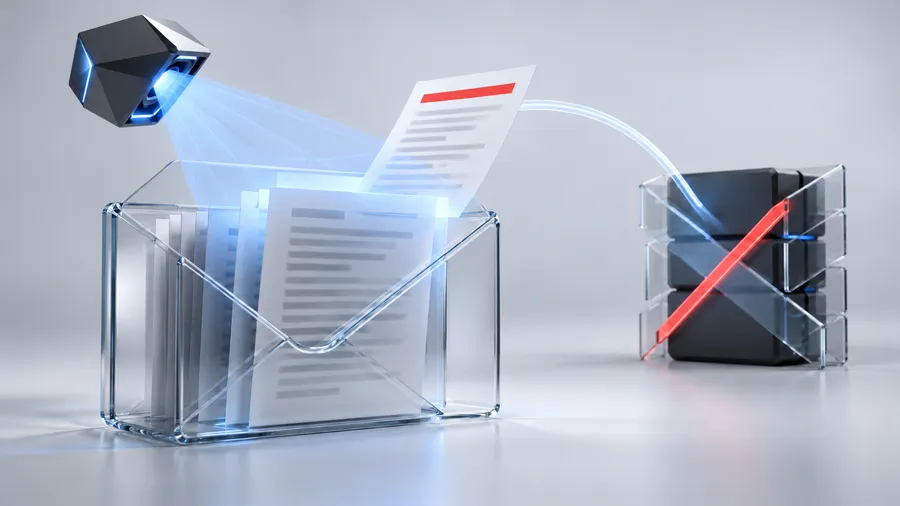
What earns it a follow-up is what EvilTokens did once it was inside. It had an AI assistant that read the stolen mailbox for the criminal: who approves payments, which vendor invoices are pending, which wire transfer is due Friday. Then it drafted the fraud email for them.
What Microsoft actually took down
The facts, as reported by Microsoft and the researchers who worked the case:
- The service. EvilTokens was phishing-as-a-service. It was a rental kit, not a hacking group. Microsoft tracks the operators as Storm-2992. It showed up on Telegram in mid-February 2026 and was the first platform to sell device code phishing at scale.
- The price. $500 a month for the kit and control panel, or a $1,500 setup fee for the full admin panel plus the monthly license. Add-ons included email-sending tools and bot-evasion redirectors. Coinbase traced roughly $1.1 million in cryptocurrency payments to the operators.
- The reach. More than 12,000 compromised inboxes across more than 10,000 organizations. The heaviest activity was in the US, Canada, the UK and Australia. SpyCloud recovered data on 8,708 victim accounts, and about 97.5% of them were business domains, not personal email.
- The takedown. A federal court in the Eastern District of Virginia authorized Microsoft to seize 50 websites. More than 150 supporting domains were disabled. Health-ISAC, Cloudflare, Coinbase, OpenAI, SpyCloud, TRM Labs, The Shadowserver Foundation and Railway all helped. London’s Metropolitan Police arrested two men, aged 32 and 38, on September 11. Both were released on bail while the investigation continues.
That’s a good outcome, and the people who did the work deserve credit. It still doesn’t belong under “solved.”
The new part: an AI that reads your stolen inbox
Older phishing kits got the criminal into the mailbox and stopped there. The criminal then had to read thousands of emails, work out how the company runs, find the money and write a convincing fake. That took time and skill, and both kept the number of attackers down.
EvilTokens did most of that work for them. Once a victim approved the login, the platform:
- Mapped the organization. It used Microsoft Graph, the same interface legitimate Microsoft 365 apps use, to pull the org chart. It worked out who reports to whom, who sits in finance and who the executives are.
- Read the mailbox with AI. An AI assistant combed through the email looking for trusted relationships, payment approvals and sensitive responsibilities. According to SpyCloud, it read mail in more than 20 languages.
- Ran preset searches. It had built-in prompts to find wire-transfer conversations, identify the person who moves money, locate pending vendor invoices and pick the best person to impersonate.
- Wrote the fraud. It suggested a fraud strategy and drafted messages posing as trusted contacts. Microsoft’s Steven Masada said the platform “could even recommend fraud strategies, including drafting messages that impersonated trusted contacts to help criminals trick victims into taking action.”
Think about what that means for a 25-person construction company. Your bookkeeper’s inbox has every vendor you pay, how often you pay them, what the invoices look like, who signs off and how that person writes. A human criminal would need days to piece that together. EvilTokens did it on request and handed back a ready-to-send email: “Hi Karen, quick update, we changed banks, please use the new account below for invoice #4471.” It would be written in your vendor’s voice, reference a real invoice and land in the middle of a real email thread.
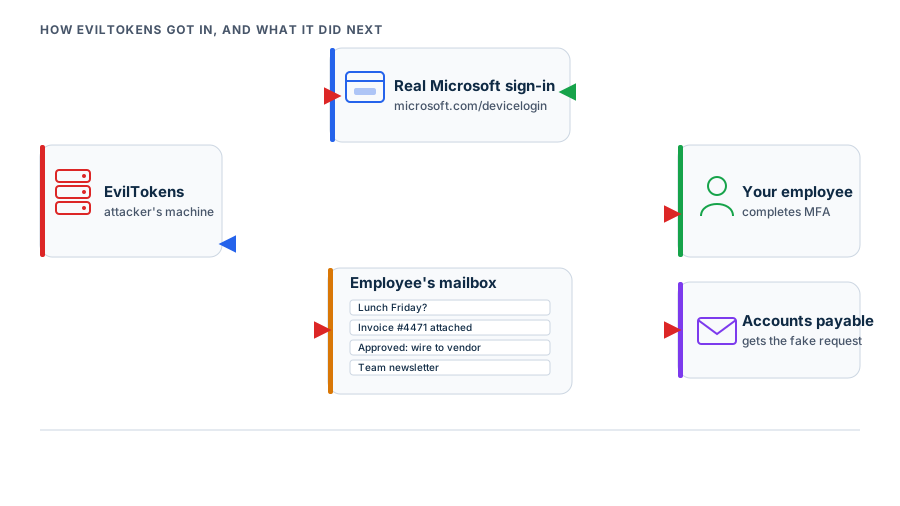
This is business email compromise, the fraud that has cost US businesses more money than ransomware for years, with the hardest part automated. The FBI’s numbers have put business email compromise losses in the billions every year. What limited it was the labor of research and writing, and that labor is now a $500 subscription.
Why the $500 matters more than the 12,000
TRM Labs said EvilTokens was “lowering the expertise once needed to run business email compromise and invoice fraud at scale.” SpyCloud’s Trevor Hilligoss said the same thing more bluntly: tactics that used to take real skill, “EvilTokens made them available to anyone for $500 a month.”
Microsoft and its partners called the operation a disruption, and they chose that word carefully:
- Copies already exist. Device code phishing spread quickly this year. By April at least ten phishing platforms supported it, and clones like APToken are already circulating.
- The software was cheap to build. Researchers reported that much of EvilTokens was written with AI coding tools. Barracuda’s write-up of the takedown argues that this is exactly why such platforms are now quick to rebuild after they’re seized.
- Former customers still have their tools. Seizing 50 websites removes infrastructure. It doesn’t remove the skills, the target lists or the incentive from the hundreds of people who paid for the service.
So the real lesson is that this kind of attack is now a commodity. Expect the next version to be cheaper, and assume someone is already selling it.
Who it went after
The industries named in the reporting read like a list of small businesses across New Hampshire and Massachusetts: construction, financial services, healthcare, real estate, wholesale distribution and higher education. These are businesses where money moves by email between people who trust each other.
The lures matched that. EvilTokens shipped 44 customizable phishing templates, and the email subjects researchers found included:
- Construction bids and RFPs
- Invoices and payment notices
- Shared files and document-signing requests
- Partnership agreements
- Compensation and benefits notices
- Voicemail and eFax alerts
- Password-expiration warnings
None of these looks like an emergency, and that’s deliberate. An RFP invite in a general contractor’s inbox looks like work, not a threat. The links also went through redirect chains on legitimate cloud platforms and fake CAPTCHA pages, specifically to get past email filters. By the time the employee saw the code and the “Continue” button, it had already beaten the spam filter and was sending them to the real Microsoft sign-in page.
If you work in healthcare, there’s one more problem. An attacker reading a clinic manager’s mailbox is reading patient information. Under HIPAA, a compromised mailbox that holds protected health information can be a reportable breach even if no money is stolen, and that assessment belongs on the incident checklist from the first hour. This is one reason Health-ISAC was a partner in the takedown, and it’s a core part of the work we do in HIPAA compliance services.
A password reset doesn’t get them out
Most small businesses will skim past this line in Microsoft’s announcement, and it matters most if you think you’ve already been hit.
EvilTokens got Microsoft to issue the attacker tokens: an access token that works right now and a refresh token that keeps generating new ones. Microsoft warned plainly that access “could persist even after a password reset if the associated sessions and tokens were not also revoked.”
The usual small-business response to “I think I clicked something bad” is to change the password and move on. Against this attack, that does nothing. The attacker’s session is still valid, and they keep reading the mailbox while everyone assumes it’s handled.
A real cleanup includes:
- Revoke the user’s sessions in Microsoft Entra (the admin center has a “Revoke sessions” action). This invalidates the refresh tokens the attacker is holding.
- Reset the password and re-register the user’s MFA methods.
- Remove anything the attacker set up for themselves. That means inbox rules, forwarding addresses, newly registered devices and app permissions. These are how attackers come back.
- Check the sent mail for messages the user didn’t write, and warn anyone who received one.
Skip step one and the other three only buy you a few hours.
Were you hit? What to check this week
You don’t need a breach to justify doing this. The 12,000 victims weren’t a special class of careless company. They were ordinary businesses with ordinary inboxes. If you’re on Microsoft 365, spend an hour on this list, or ask your IT provider to do it and show you what they found.
- Look for device code sign-ins. In the Microsoft Entra sign-in logs, filter by authentication protocol for device code. Most small businesses should find none. Any that turn up from a user who has never signed in to a TV, a conference room display or a command-line tool need an explanation.
- Audit inbox rules across every mailbox. Watch for rules that forward mail outside the company, move messages into RSS Feeds, Archive or other folders nobody reads, or delete messages containing words like “invoice,” “payment,” “wire” or “bank.” Attackers use these to hide vendor replies from the real user.
- Check registered devices. Device code attackers often register a device of their own to stay in longer. A device nobody recognizes, registered on a date nobody remembers, is a finding.
- Review app consents. Look at which third-party apps have been granted access to mailboxes. Anything unfamiliar with mail-read permissions should come out.
- Pull the last 90 days of vendor bank-change requests. This step is about accounting, not IT. Any request that came in by email and was acted on without a phone call to a known number is the exact scenario EvilTokens was built for.

If any of that turns up something you can’t explain, treat it as an incident. Revoke sessions first and investigate second.
Close the door it walked through
We went through the full set of controls in the original device code phishing post, so here’s the short version, plus one control the AI angle makes more urgent.
- Block the device code flow with a Conditional Access policy if nobody in your company uses it. For most small businesses, nobody does. An attack that depends on a feature you’ve turned off doesn’t work.
- Put Conditional Access behind every sign-in. Block countries you don’t operate in, require company-managed devices for sensitive data and turn off legacy authentication.
- Move the money people to phishing-resistant MFA. Passkeys or hardware security keys for anyone who approves payments, holds admin rights or owns the company.
- Have someone watching the logs who will act the same day. A device code sign-in, a new forwarding rule or a 3 a.m. login from another continent all show up in the logs. They only help if someone reads them, which is the job of real managed cybersecurity services.
- Teach one rule. Never enter a code into a Microsoft sign-in page unless you started the process on the device asking for it.
The extra control is a process for your accounting team: no bank detail change gets paid without a phone call to a number you already have on file. Don’t call the number in the email. Call the one in your vendor records. EvilTokens’ AI could copy your vendor’s writing style, reference a real invoice and reply inside a real thread. It couldn’t answer the vendor’s actual phone. Once that rule is in place, the most profitable thing this platform did stops working.
Most of the technical controls above are settings you already pay for in Microsoft 365 Business Premium. They just aren’t on by default. Setting them up properly, and keeping them working as your team changes, is what Microsoft 365 managed services should cover. If your provider has never mentioned Conditional Access, ask them why.
What you can actually control
Microsoft, law enforcement and a long list of security companies shut down a service that had already broken into more than 12,000 inboxes, and that’s worth celebrating. It’s also worth remembering that renting an AI to read a stolen inbox and write the fraud email cost $500 a month, plenty of people paid it, and the next version is probably already for sale.
You can’t control what criminals sell each other on Telegram. You can control whether your tenant accepts device code logins, whether a stolen session gets anywhere, whether anyone notices a forwarding rule within a day and whether your bookkeeper picks up the phone before changing a vendor’s bank details. None of that requires a big new security budget. It takes a few hours of configuration and one habit.
If you’re not sure whether your Microsoft 365 tenant was exposed to EvilTokens, or would stop whatever replaces it, RNITS will check it with you. Start with a free cyber security audit and we’ll look at your sign-in logs, inbox rules and Conditional Access setup, then tell you plainly what’s open and what to fix first.