· RNITS Cybersecurity · 11 min read
✦ Switch to AI viewLoading…
October's Ransomware Surge Ran on Patches You Already Had
October was 2026's second-worst ransomware month. The way in was old: VPN, firewall and backup bugs with fixes available for months, some for years.

Every month, a couple of trackers count ransomware attacks. October’s totals came in this week, and they’re bad.
Comparitech recorded 1,020 ransomware attacks in October 2026, the second-highest month of the year and about 33 a day. Another tracker, HackerFeeds, counted 1,127 victims posted to gang leak sites, up 25.8% from September. The two count slightly different things, so the numbers don’t match exactly, but they agree on direction: up, and sharply.
The United States took the biggest hit. Comparitech put 442 of October’s attacks on U.S. organizations, 43% of the global total. Healthcare had its worst month of the year, with 85 attacks. Schools and school districts set a new record at 47.
What bothered us more than the volume was how the biggest gangs got in. The doors they used were old.
The doors were already fixed
When a ransomware month spikes, the natural assumption is that someone found a powerful new trick. Sometimes that’s true. We wrote in August about firewall and VPN zero-days, the kind where no patch exists yet and even a well-run shop is exposed.
October was different. The three busiest attack paths in the public reporting all used vulnerabilities that already had fixes:
| What got exploited | Fix available since | Age of the fix in October |
|---|---|---|
| Palo Alto GlobalProtect VPN, CVE-2026-0257 | May 2026 | About 5 months |
| Fortinet FortiGate (FortiOS), CVE-2024-55591 | January 2025 | About 21 months |
| Veeam Backup & Replication, CVE-2023-27532 | March 2023 | About 3.5 years |
So October’s surge ran on patches that had been sitting on vendor download pages for months, in one case for years. Nobody needed a brilliant new technique.
Who was behind it and how they got in
Qilin and INC: through the VPN, past MFA
On October 19, Palo Alto Networks’ Unit 42 research team updated its advisory on CVE-2026-0257, an authentication bypass in the GlobalProtect VPN portal and gateway. Their finding: two of the most active ransomware operations, Qilin and INC, are using it to get into corporate networks.
The part that should make business owners sit up is what the flaw lets them do. In Unit 42’s words, attackers gain “an initial foothold into corporate networks, subsequently bypassing multi-factor authentication (MFA) controls to establish a VPN session.”
Those businesses did what everyone tells them to do. They put MFA on the VPN, and the attackers went around it, because the bug sits in front of the login prompt rather than behind it.
Once connected, the attackers show up as a VPN session. To your network that looks like someone working from home. From there, Unit 42 saw them:
- Map the internal network using remote monitoring and management (RMM) tools, the same kind of software your IT provider uses
- Move between machines over Remote Desktop and Windows file sharing
- Jump from the VPN gateway to the VMware management server, switch off security controls on the virtualization hosts, and pull passwords straight off a copy of the domain controller’s virtual disk
- Chain in a second, older exploit aimed at Veeam backup servers, which we’ll get to
Palo Alto has offered fixes since May. CISA added the flaw to its Known Exploited Vulnerabilities catalog on May 13, which is the government’s way of saying “this is being used in real attacks, patch it now.” Ransomware crews were still finding unpatched gateways five months later.
The Gentlemen: a 2024 FortiGate bug, plus stolen logins
The Gentlemen were October’s most prolific group by Comparitech’s count, with 139 attacks. They’re a newer operation that split off from Qilin in mid-2025, and they’ve grown faster than almost anyone tracking them expected.
According to Halcyon’s threat assessment, their main way in is CVE-2024-55591, an authentication bypass in Fortinet’s FortiOS firewall software. Fortinet patched it in January 2025. Halcyon reports the group sitting on roughly 14,700 already-compromised FortiGate devices and close to a thousand brute-forced FortiGate VPN logins, a stockpile of access built up from firewalls nobody updated.
Their other favorite is stolen credentials. Ransomnews reports that the group “leans heavily on credentials and session cookies harvested by commodity stealer malware.” That’s the cheap malware that rides in on a fake browser update or a pirated download and quietly copies every saved password and logged-in session on a PC. A stolen session cookie is especially nasty because it represents a login that has already passed MFA. Replay it, and the system thinks the real user is back.
Halcyon describes The Gentlemen’s victims as ranging “from small and mid-market firms to sizeable entities.” Small businesses are on the target list on purpose.
SafePay: the same story, with an FBI stamp on it
On October 20, the FBI and CISA published a joint advisory on SafePay, a group they say has hit roughly 600 organizations since August 2024. The way in, again, was VPNs and internet-facing devices. If the FBI is writing advisories about the kind of equipment in your closet, it’s worth an afternoon to check yours.
They come for the backups first
Getting in is only step one. What turns a break-in into a business-ending event is what happens next, and both of October’s top groups go after the same thing: your ability to recover.
Unit 42 saw Qilin and INC chain their VPN access with exploits for CVE-2023-27532, a flaw in Veeam Backup & Replication. Veeam is one of the most common backup products in small and mid-sized businesses. We see it constantly. This bug lets someone on the network pull the stored credentials out of the backup server without logging in, and those credentials often unlock the very systems being backed up.
Veeam fixed this in March 2023. In October 2026, gangs still found enough unpatched backup servers to make it part of the playbook.
The Gentlemen are just as direct. Halcyon reports they “specifically target NAS systems, Exchange servers, storage arrays, and backup infrastructure before encryption to prevent recovery.” On Windows they stop backup services and delete shadow copies. On Linux and NAS devices they destroy file system snapshots. On VMware hosts they wipe virtual machine snapshots, then run a dedicated locker that shuts the VMs down and encrypts them.
Here’s the order of operations, the way these groups actually run it:
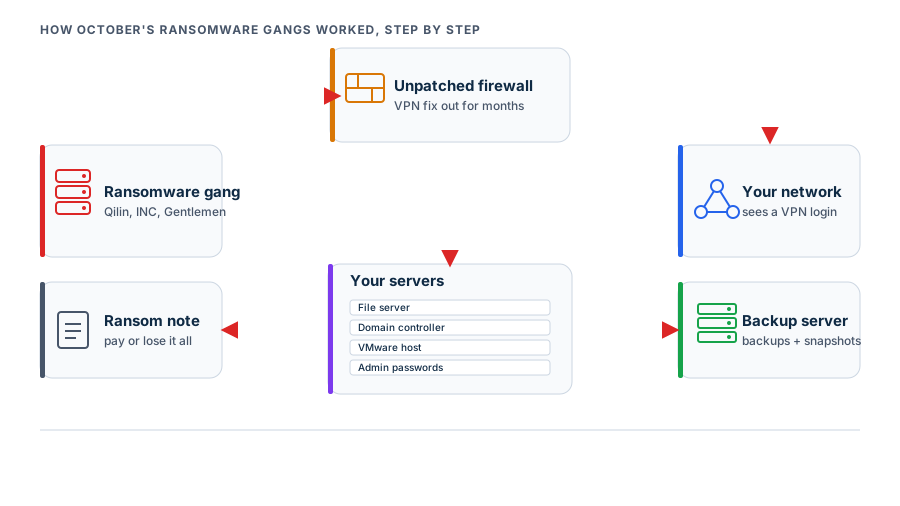
Notice that encryption, the part everyone pictures when they hear “ransomware,” is the last step. By the time the ransom note appears, the attackers have usually spent days or weeks inside, and they’ve made sure your backups won’t save you. That’s how a bad week turns into a “pay or close” decision.
Why this keeps landing on small businesses
None of these patches were hard to find, and the businesses that miss them usually aren’t careless. From what we see walking into new client offices around New Hampshire and Massachusetts, the problem is that nobody owns the job.
- The firewall was a project, not a service. Someone installed it, handed over a password, and left. There was never a line item for “keep this patched,” so when a critical fix drops, nobody’s phone buzzes.
- The backup server is “set and forget.” People check that backups ran. Almost nobody checks whether the backup software itself is up to date. A Veeam server from 2022 that still emails a green “Success” every night is a perfect target.
- Windows updates get mistaken for patching. Automatic updates on laptops are great, but they don’t touch the firewall’s firmware, the VPN, the NAS or the backup software. Those are separate products with separate update processes, and they’re the ones getting exploited.
- Support contracts lapse. Most firewall vendors only release firmware to customers with an active subscription. Let it expire and you can’t download the fix even when you want it.
- MFA felt like the finish line. MFA matters, and it stops a huge share of attacks. But October showed two ways around it: a VPN bug that skips the login entirely, and stolen session cookies that replay a login that already passed. MFA is one layer, not the whole wall.
The sectors that grew fastest in October line up with this. Comparitech’s numbers show attacks on construction up 35% and legal up 20% between August and October. Both are industries full of small firms that run a firewall, a file server, a backup box and not much IT staff. Manufacturing stayed the single most-targeted sector.
Six checks to run this month
You don’t need a security team to close the doors October’s gangs used. You need someone to spend an afternoon on these, and then keep doing them. If you have an IT provider, forward them this list and ask for answers in writing.
1. Find out what’s facing the internet
Make a list of everything someone outside your office can reach: the firewall, the VPN, any remote desktop access, the NAS’s remote-access feature, a camera system, a phone system portal. You can’t patch what you don’t know about. If you’re not sure, an outside scan will show you what an attacker sees.
2. Check firmware on the firewall and VPN, by name
Don’t accept “it’s up to date.” Ask for the brand, model and exact firmware version, then compare it to the vendor’s current release.
- Palo Alto GlobalProtect: confirm you’re on a version fixed for CVE-2026-0257. Unit 42 also recommends disabling the “Authentication Override” cookie options in the portal and gateway settings, or at least giving them a dedicated certificate.
- Fortinet FortiGate: confirm you’re past the fix for CVE-2024-55591, and that the management interface isn’t reachable from the internet at all.
- Any brand: check the end-of-support date. An appliance past end of life gets no more fixes, ever.
3. Patch the backup server like it’s a server, because it is
Check the version of Veeam (or whatever you use) and update it. Then make sure the backup server isn’t joined to your normal Windows domain with the same admin accounts as everything else. If an attacker steals one password, it shouldn’t unlock both your servers and their backups.
4. Keep one copy they can’t touch
This is the single most important item on the list. At least one copy of your backups should be immutable (it can’t be changed or deleted for a set period, even by an admin) or offline. Cloud backup with immutability turned on, or a hardened repository, counts. A NAS in the same closet on the same network, using the same passwords, does not.
Then test a restore. Not “the job said Success,” but an actual file or an actual server brought back. If you’ve never done it, you don’t know whether it works.
5. Hunt for infostealers and stale sessions
If a staff member’s PC gets infected with password-stealing malware, every saved login on it should be treated as stolen, and that means resetting passwords and signing out every active session. Endpoint protection with real monitoring catches most of these infections. Also look for remote access tools nobody approved. Attackers love using legitimate RMM software because it doesn’t set off alarms.
6. Put someone’s name on each item
The fix for “nobody owns it” is giving each piece an owner: firewall, VPN, backup server, NAS. Write down who patches it, how often, and who checks. If the answer for any of them is “I don’t know,” that’s the one to deal with first.
What this looks like when it’s handled
None of this is exotic. It’s ordinary maintenance, done every month. It’s what we mean by patch management that goes past Windows Update to cover firmware, appliances and backup software, and it’s the reason we treat backup and recovery as a security control rather than a checkbox. Pair that with 24/7 monitoring that would notice a “remote worker” logging in at 3 a.m. and running network scans, and you’ve closed most of the paths October’s gangs walked through.
What frustrates us about months like October is that most of the damage was preventable with information that was already public. The patches existed. The advisories were published. CISA had listed the GlobalProtect flaw as actively exploited back in May. The businesses that got hit fell into a gap in ownership, where every system had a vendor and none had a person.
If you’re not sure whether your firewall, VPN or backup server is on a fixed version, or whether your backups would survive someone deliberately trying to delete them, that’s exactly what our free cyber security audit checks. We’ll tell you what we find in plain language, including when everything is fine, and you’ll get a short list of what to fix first.